- The Atomic Builder
- Posts
- How to Build AI Systems That Get Exponentially Smarter
How to Build AI Systems That Get Exponentially Smarter
Your AI Should Remember You. Today, Tomorrow, Forever.

Faisal Shariff
January 13, 2026
You know compound interest? It looks boring on paper until you see the 30-year chart and realise what "exponential" actually means.
That's what's happening with Claude Code right now, and most business users are missing it.

I like to think of it as Claude Computer
Developers (and vibe coders) figured it out first. They've been using Claude Code to write software, but here's what they discovered that matters for everyone: context is everything. Regular AI chat resets every conversation. At best you have projects or GPTs, maybe even skills you use with ChatGPT or Claude AI, but you're (mostly) always starting from zero, re-explaining your preferences, rebuilding context, teaching the same things over and over.
Claude Code works differently. It remembers. And over time, that difference becomes exponential.
What is Claude Code?
Claude Code isn't a coding tool that happens to do other things. It's a general-purpose AI with access to your computer that happens to be exceptionally good at code. I prefer to think of it as Claude Computer - an AI that can use your browser, file system, terminal commands, and everything else on your machine.
People (like me) are using it as their chief of staff for meeting management. To fix Mac settings instead of digging through System Preferences. To organise files, analyse data, create calendar systems. The coding capability is almost incidental.
If the word "code" in the name has kept you from trying this, ignore it. This is about giving AI access to do actual work on your machine, not about learning to program.
The name is misleading. And honestly, it's almost certainly slowing adoption.
The Context Problem Nobody Acts On
I spent months using ChatGPT and Claude the same way everyone does. Type a question, get an answer, close the tab. Start fresh tomorrow.
Every conversation began with me explaining my writing style, my audience, my preferences. Every email draft required me to specify tone and format. Every meeting summary needed detailed instructions about structure.
I was productive in the moment, but I wasn't building anything that lasted.
Then I started using Claude Code for my consulting work and newsletter. Six months in, the difference is absurd.
Now I type /meeting-summary and get formatted notes that reference previous meetings. I ask for a project update and Claude already knows which files to check, what format I prefer, what happened last quarter. I request an email draft and get three options that already sound like me.
Same AI model. Completely different system.
The Three Layers That Compound
Think of Claude Code like building a knowledge foundation with three layers. Each layer makes the next one more powerful.
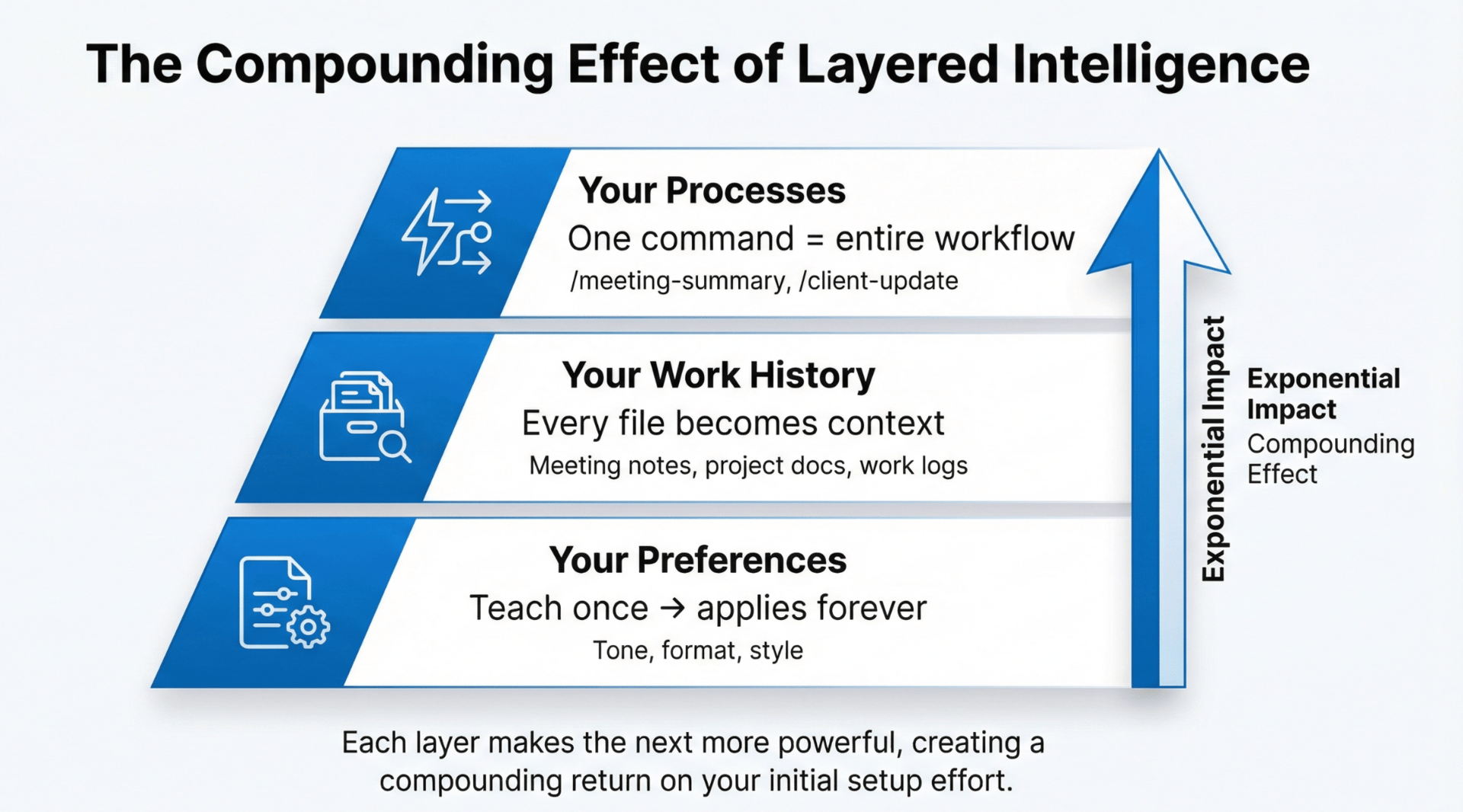
Layer 1: Your Preferences
This is how you work, how you communicate, what good looks like to you. With regular chat AI, you teach this in every conversation. With Claude Code, you teach it once in a CLAUDE.md (just a plain text document) file.
I documented my writing preferences once: tone, structure, how I handle examples, words I avoid. Now every piece of content Claude creates matches my style automatically. No more "can you make this less formal" or "remove the corporate jargon." It already knows.
For meeting notes, I specified my format once. Now /meeting-summary generates exactly what I need every time - attendees, key decisions, next steps, timeline. Same format, zero re-explanation.
This sounds simple, but multiply it across dozens of tasks and it adds up fast.
Layer 2: Your Work History
Claude Code can read your actual files. Meeting notes from three months ago. Project documentation. Email threads.
When I ask for a client status update now, Claude reads my work log - a running file I maintain that captures what I've done, when, and why. It pulls context from previous meetings, references past decisions, checks project timelines.
The output isn't just accurate. It's contextualised in ways that would take me 30 minutes to recreate from memory.
I've started keeping structured logs for most of my work. Not because I'm unusually organised, but because Claude makes them valuable. Every entry I write becomes context for future conversations.
Layer 3: Your Processes
This is where it gets interesting. You can create custom commands - shortcuts that trigger entire workflows.
I have a /what-changed command that looks at what files I've changed on my Mac, reads the context, and generates a summary to my work log automatically.
One command. Two minutes. Work documented in a format that compounds for next time.
Each custom command captures a workflow you've refined through repetition. Build it once, use it forever.
What This Actually Looks Like
Let me walk you through a real example from last week.
I needed to send a client status update covering three active projects. In the old workflow: open ChatGPT, manually pull up last month's update to remember what I said, check my calendar for what actually happened, explain the format I need, paste relevant details, review the draft, realise it's missing context, add more information, iterate.
Time: 45-60 minutes, depending on how scattered my notes were.
With Claude Code: I opened my client folder (where my CLAUDE.md file lives with my communication preferences and status update format), and typed /client-update.

This is basically just a folder with instructions
Claude read my work log to see what I'd completed in the past month. Checked previous status updates to maintain consistent messaging. Referenced project timelines from my documentation. Generated an update that was 80% ready to send.
Time: 12 minutes, including edits.
More importantly, every status update I send becomes context for the next one. Claude's understanding of project progress, client priorities, and communication patterns improves over time. The system compounds.
How to Start Building Your System
The setup is simple. You don't need to be technical. You don't need to learn coding. You just need to document what you already know.

Not learning to code. Learning to delegate.
Week 1: Create Your Foundation (And Learn to Delegate)
Using Claude Code isn't about learning to code. It's about learning to manage.
Can you specify clear goals? Can you provide context? Can you break work into tasks? Can you give useful feedback? These are the skills that matter now. And if you've ever managed people, you already have them.
Install Claude Code. Create a CLAUDE.md file in your main work folder. Record yourself for 10 minutes talking about how you work - your preferences, your common tasks, what good output looks like.
Use Claude to transcribe that recording and turn it into a structured CLAUDE.md file. That's your foundation.
You're not learning to code. You're learning to provide context and delegate to something that actually remembers your instructions.
Week 2: Pick One Repetitive Task
Choose something you do weekly that requires context - status updates, meeting notes, email drafts, project documentation.
Document the format you want once. Create a simple command for it (Claude can help). Use it every time you do that task.
After four weeks, you'll have a month of context built up. Claude will reference your previous work automatically.
Week 3-4: Start Capturing Work History
Create a simple work log. After completing tasks, add a line describing what you did, when, and why. It takes 30 seconds.
Now when Claude helps with future work, it can read this history. "What did I decide about X last month?" Claude already knows.
Month 2-3: Build Custom Workflows
As you repeat tasks, turn them into commands. Notice you always need client updates in the same format? Create a /client-update command that reads your work log and generates it.
Find yourself doing the same analysis repeatedly? Build a command that automates it.
Each command you create compounds your efficiency.
The Honest Reality
This is an individual system right now.
I'm not going to oversell organisational adoption because I haven't seen clean examples of that yet. I'm using Claude Code (or Claude Computer…) to build systems of mine for my consulting work and newsletter.
But here's what's happening: people are asking how I’m getting so much done. They're noticing the volume and quality. They want to build their own systems.
I started with my own workflow to prove it works. Now I'm helping others build theirs.
Monday Morning: Start Here
Install Claude Code - Takes 10 minutes. Requires a paid Claude account.
Record yourself - Spend 10 minutes describing one task you do repeatedly. What format do you want? What makes good output? What should it avoid?
Create your first CLAUDE.md - Ask Claude Code to turn that recording into a structured markdown file.
Test it - Do that task once with Claude reading your new CLAUDE.md file. Compare it to your usual AI chat results.
That's it. That's the start of a compound system.
The difference won't feel dramatic on Day 1. But six months from now, you'll type one command and get output that would have taken you an hour. If you need help creating this system, reply to the email. See you next week! Faisal |  |
P.S. Know someone else who’d benefit from this? Share this issue with them.
Received this from a friend? Subscribe below.
The Atomic Builder is written by Faisal Shariff and powered by Atomic Theory Consulting Ltd — helping organisations put AI transformation into practice.