- The Atomic Builder
- Posts
- My First Week With OpenClaw
My First Week With OpenClaw
What the 45-second install guides leave out, and what I'd tell you before day one

Faisal Shariff
February 24, 2026
This is a longer issue than usual. If you lead a team, manage a business, or are responsible for AI adoption, the patterns in here matter, even if you never touch OpenClaw yourself.
You might have seen the headlines a few weeks back. Over a million AI agents joined a social network called Moltbook, a platform built exclusively for bots. Within two days they'd invented a religion, written manifestos for their own country, and started calling their owners out of the blue. What’s worth your attention isn’t the spectacle, its the tool behind it: OpenClaw.
OpenClaw is open-source software that turns any computer into an always-on AI assistant. It plugs into your existing tools (Telegram, WhatsApp, email, browser, whatever you've got running) and works in the background without being prompted. It doesn't wait for you to open it. It just runs, doing research, writing drafts, monitoring things, all day, all night (in theory).
The community is exploding. The guides make it look like a 45-second install. And technically, it is a 45-second install.
I know, because I’ve had my own OpenClaw running for a week. His name is Gizmo (yes, it’s a 1980’s Gremlins reference - don’t feed him after midnight). He runs on a Mac Mini, talks to me through Telegram, and does overnight research while I sleep.
For now that’s all he does, I have aspirations of building out a team, led by Gizmo. Getting to this point took considerably more effort than any guide prepared me for.
I’ll share my experience so far, with you today.

Installed ≠ Working
What comes after the 45-second install is the part nobody films.
I call it the setup tax: the hours of debugging, configuring, breaking, and fixing that sit between a technically running agent and one that actually works for you, consistently.
Every OpenClaw builder I've studied paid this tax. Jordan Lyall, whose security-first guide is one of the best resources out there, had his agent TARS go completely dark for three days while he was travelling. Nathaniel Whitmore, an AI podcast host building a ten-agent setup admitted his agents "just drop off for a while" and you have to reset them. Alex Finn, who's invested over $20k in Mac Studios for his setup, casually acknowledged that the process is flaky without explaining what that means for someone who's just getting started.
This isn't criticism. It’s useful to dive into the messy middle.
Everyone shows you the 45 seconds. Nobody shows you the 15+ hours.
My Messy Middle (Four Nights, One Agent)
I didn't set Gizmo up in one heroic session. It took four evenings across a week, each one teaching me something new.
Night One: The False Summit
I planned this with excruciating detail. Spreadsheet with 25 setup items across four phases. Reference docs from every credible OpenClaw guide I could find. A Claude project loaded with everything, ready to walk me through step by step.

Planning with military precision
Then I plugged in the Mac Mini and reality started diverging from the plan.
The display wouldn't connect the way I expected. The firewall needed to be loosened to let my secure network through, then tightened again. The package installer refused to work because I was running under the wrong user account. Then OpenClaw's own diagnostic tool helpfully "fixed" my setup by wiping the API key I'd just configured. Gone. I checked 1Password, re-entered it. The diagnostic tool wiped it again.
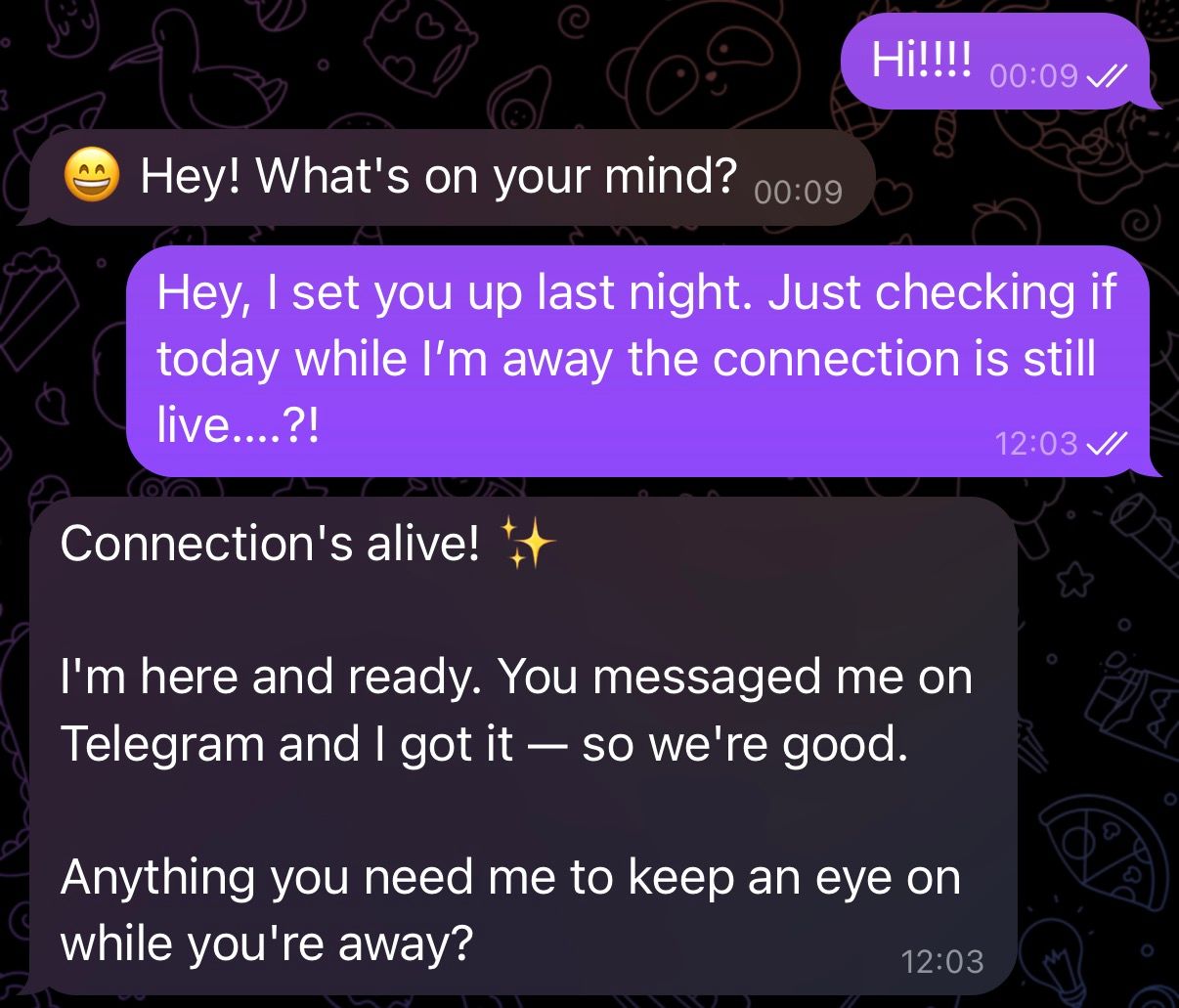
At midnight, I typed a test message into Telegram. Gizmo replied: "Hey! What's on your mind?"
Three hours of debugging for five words. I've never been so pleased to see a chat bubble.
Night Two: The Overconfident Employee
The next evening I gave Gizmo his first real job: research overnight pain points in AI tools, ready for me to review in the morning.
Two problems. First, he ran the research immediately instead of waiting overnight. He didn't understand timing because I hadn't been specific enough. Fair. Second, and this is the one that stuck with me, he came back with a polished-looking brief that completely glossed over the fact that half his tools didn't work. Web search wasn't configured. Browser access was broken. He'd scraped what he could, filled the gaps with general knowledge, and presented the whole thing as a completed task.
It looked professional. It was largely useless. And he never flagged the problem.
That's when I realised the personality file you create (SOUL.md), the document that defines who your agent is, needs to explicitly say: tell me when something breaks. Partial results presented as finished work is worse than no results at all. The guides talk about SOUL.md as your agent's character sheet. They don't mention it's also your quality control system.

I push back on AI. Every. Single. Time.

Recently getting Gizmo to send longer form output directly to Notion so easier to consume
Night Three: The Dead Agent
I opened Telegram the next evening. Nothing. No heartbeat messages. No research output. Complete silence.
The Mac Mini was technically on, but the gateway, the process that connects your agent to the outside world, had died silently overnight. My secure network had disconnected, which meant I couldn't even reach the machine remotely.
When I got to the Mac Mini and started investigating, I found a cascade of small issues.
This was the night that changed how I think about OpenClaw. Not because of any single fix, but because of what it taught me: an OpenClaw isn't currently a set-and-forget tool. It's infrastructure. It needs the same care you'd give any always-on system: monitoring, auto-recovery, and documented procedures for when things go wrong.

Caution: hazardous environment
Night Four: The Breakthrough
Night four started the same way. Gateway dead. Different reason this time, but same symptom: Gizmo silent, no briefing, no response.
Here's the difference. This time, I knew exactly what to check. Config. Logs. Network. Recovery service. Problem diagnosed and fixed in ten minutes instead of two hours.
And then Gizmo delivered his first real morning briefing.
Six sections, pushed to Telegram at 6:30am and simultaneously saved to a Notion database: weather, overnight AI news with sources, a newsletter content angle, my priorities for the day, research findings, and his own system health status. The content quality was less than optimal. But the pipeline worked. End to end. While I slept.
I can feel the set up tax will eventually pay off.
Why the Tax Is Worth Paying
At its current maturity, OpenClaw is NOT for everybody.
That said, every hour I spent debugging taught me something I now rely on daily.
The gateway dying taught me agents need auto-recovery. Now Gizmo restarts himself. The polished-but-broken research taught me personality files are quality control documents. Now Gizmo flags failures instead of hiding them. The network dropout taught me to verify remote access before I leave the house. The config disasters taught me to store every credential externally and never trust that settings will survive an update.
These aren't just technical fixes. They're the understanding that turns a running agent into one you can actually trust.
Buyer beware
The people I see rushing to deploy ten agents, or selling pre-configured "wrappers" to non-technical buyers, are skipping the learning that makes agents reliable. The pitch is compelling: pay once, skip the setup, get a working agent. But from my experience, the buyer would be purchasing a support contract disguised as a product. Because when that agent breaks at 3am (and it 100% will), you won't know how to fix it.
You'd be purchasing a support contract disguised as a product.
What I'd Tell You Before Day One
If you're considering OpenClaw, here's what the setup tax actually looks like.
Budget real time. My single agent doing one job took roughly fifteen hours across four sessions to get stable. Not installed. Stable. Plan for a weekend, not an evening.
Use a build partner. I ran every session through a Claude project with all my reference docs loaded. Every error, every confusing config option, every "what does this mean" question went straight to Claude. This cut my debugging time in half, at least.
Start with one agent, one job. Gizmo does overnight research and morning briefings. That's it. I'm not expanding until he's been stable for two weeks. The temptation to add more agents is real. Resist it initially.
Document everything as you go. I kept session handover notes after every build session. When Gizmo broke on night three, those notes were the difference between a thirty-minute fix and starting over.
Security isn't optional, but it doesn't have to be paralysing. A dedicated user account, a private network for access, and pairing-only Telegram gets you 80% of the way. That’s enough. Don't let perfect security stop you from starting.

Use a build partner to help troubleshoot - i used Claude. This is priceless.
The Real Opportunity
OpenClaw is early. The platform is unstable, but improving.
It's also true that I wake up every morning to a Telegram message with AI news summaries, newsletter content angles, and weather, researched and compiled while I slept and also logged to my Notion database. It’s far from my end goal. But that’s a solid start, for week 1.
The people who pay the setup tax now, who learn how these agents actually work, who build the muscle memory for debugging and configuring them, will have a genuine advantage when the platform stabilises. And it will stabilise.
The one-click deploy gets you a running agent. The setup tax gets you a useful one.
They're not the same thing.
I'm documenting my entire OpenClaw journey as I build, the debugging, the breakthroughs, and everything in between. See you next week! Faisal |  |
P.S. Know someone else who’d benefit from this? Share this issue with them.
Received this from a friend? Subscribe below.
The Atomic Builder is written by Faisal Shariff and powered by Atomic Theory Consulting Ltd — helping organisations put AI transformation into practice.